

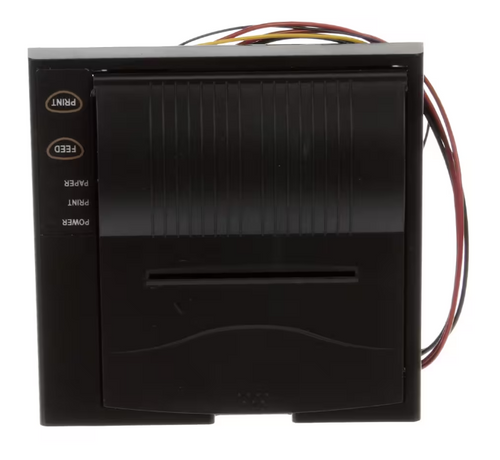
Upgrade control and documentation with a durable industrial printer designed for integration with blast chillers and cold storage equipment. This printer supports production environments by producing clear, consistent labels and logs that streamline compliance, traceability, and production flow. PartsTown has established systems of support since 1998, and this component delivers reliable output while minimizing operator intervention.
LongDescription#@#NA#@@#Cleaning Instructions#@#Wipe the printer exterior with a soft cloth and mild detergent; avoid soak or spray exposure to openings. Clean high-touch zones—buttons, covers, cables—after each shift using EPA-registered disinfectant and allow contact time per label. Inspect gasket and vents weekly; remove debris with compressed air. Recover spilled fluids immediately to prevent corrosion and contamination. Regular cleaning reduces cross-contamination, supports compliance, deters pests, and preserves equipment life.#@@#Additional Info#@#PartsTown HD PNT9901 printer for the Omni Blast Chiller OPC-190 offers direct thermal printing, measuring 6.5" x 6.5" x 4" and weighing 0.93 pounds.#@@#General Info#@#Description #@#
Upgrade control and documentation with a durable industrial printer designed for integration with blast chillers and cold storage equipment. This printer supports production environments by producing clear, consistent labels and logs that streamline compliance, traceability, and production flow. PartsTown has established systems of support since 1998, and this component delivers reliable output while minimizing operator intervention.
#@@# Compact Footprint#@#
Mount units in constrained control panels and maintain accessible routing with a 6.5-inch width and 4-inch height chassis. Technicians will appreciate the small envelope that reduces required panel space and simplifies retrofits in existing cabinets.
#@@# Lightweight Design#@#
Handle installation and service without heavy lifting thanks to a 0.93-pound mass that reduces strain during mounting. Maintenance cycles shorten when staff can reposition the module quickly and safely.
#@@# Integrated Compatibility#@#
Interface directly with OPC-190 style blast chiller controllers to produce time, temperature, and program records at the point of process termination. Operators gain immediate printed evidence of cycle completion for HACCP and internal audit workflows.
#@@# High Resolution Output#@#
Deliver legible print that captures timestamps, setpoint values, and batch identifiers so line supervisors can verify process parameters without accessing central systems. Labels and reports retain clarity under low ambient light in cold rooms.
#@@# Durable Construction#@#
Stand up to cold room conditions with a component built to survive frequent temperature shifts and typical kitchen handling. Technicians will find that robust materials reduce replacement frequency and lower total cost of ownership.
#@@# Service Friendly#@#
Swap this module quickly during scheduled maintenance windows using common service procedures and connector types.
#@@#Delivery Details#@#
• Please ensure to handle the product with utmost care.
• Check if the product you have received has all the essential parts and accessories.
• Make sure to examine the product for damage before signing the delivery receipt.
• Contact customer service for delivery concerns.
• Delivery times may vary based on location.#@@#deliverynotes#@#NA#@@#Maintenance Guide#@#Inspect printer connections monthly and tighten ribbon and cable connectors to prevent intermittent faults. Clean print head with isopropyl alcohol and lint-free swabs after heavy use to maintain nozzle clarity. Replace worn ribbons and foam pads at manufacturer intervals to avoid print defects. Verify paper path for debris and align feed rollers when misfeeds occur. Record maintenance actions and serials for traceability and warranty compliance.