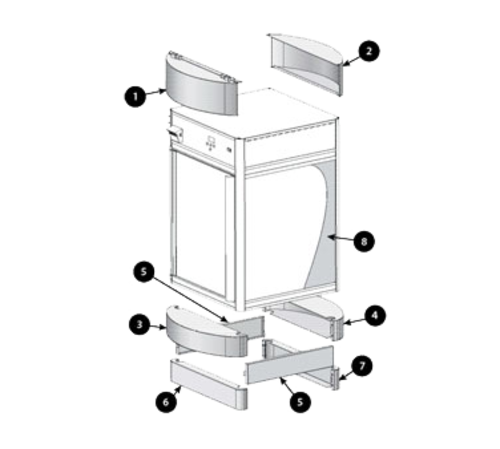


Upgrade display performance and streamline maintenance with a precision-engineered flat panel designed for commercial bakery display cases. This front panel adapts seamlessly to compatible units, restoring a uniform visual presentation and protecting interior components while simplifying field service and parts replacement. Professionals gain a durable, serviceable solution that minimizes downtime and preserves case functionality.
LongDescription#@#NA#@@#Cleaning Instructions#@#Wipe the Hatco FSD-SQB front panel with a soft cloth and a mild detergent solution, then rinse with clean water and dry immediately to avoid streaks. Disinfect high-touch zones like handles and edges using an EPA-registered sanitizer per label contact time. Inspect seals and mounting points; tighten fasteners as needed. Clean weekly or after heavy use to prevent contamination transfer, deter pests, comply with health codes, and extend panel service life.#@@#Additional Info#@#Hatco FSD-SQB flat front panel fits FSD and FSDT bakery displays, pairing with two side panels and one back panel. Installers must provide 4" adjustable legs.#@@#General Info#@#Description #@#
Upgrade display performance and streamline maintenance with a precision-engineered flat panel designed for commercial bakery display cases. This front panel adapts seamlessly to compatible units, restoring a uniform visual presentation and protecting interior components while simplifying field service and parts replacement. Professionals gain a durable, serviceable solution that minimizes downtime and preserves case functionality.
#@@# Front Panel#@#
Engineered as a single flat front panel, this component restores the display facade to factory alignment for consistent product visibility. Technicians can replace the panel quickly, reducing service time and returning the case to full operation with minimal disruption.
#@@# Side Panels#@#
Supplied with two flat side panels, the set provides matched surfaces that maintain uniform thermal and visual properties across the case perimeter. Staff install side panels to prevent air leaks and maintain internal conditions that support safe product presentation.
#@@# Back Panel#@#
Includes one flat back panel to complete enclosure integrity and protect electrical or refrigeration elements from incidental contact. Maintenance teams secure the back panel to simplify access control and preserve the service area from contamination.
#@@# Compatibility Note#@#
Fits FSD and FSDT model series when installers supply 4-inch adjustable legs, which the package does not include. Service personnel should confirm leg availability before scheduling field work to avoid repeat visits.
#@@# Materials and Finish#@#
Manufacturers craft panels to match original case aesthetics and mechanical interfaces, ensuring fitment accuracy and consistent finish across repaired units. Quality materials resist routine wear and allow cleaning protocols used in high-turnover display environments.
#@@# Parts Support#@#
Order identifies as part number FSD-SQB for procurement and inventory control within parts catalogs and service workflows.
#@@#Delivery Details#@#
• Please ensure to handle the product with utmost care.
• Check if the product you have received has all the essential parts and accessories.
• Make sure to examine the product for damage before signing the delivery receipt.
• Contact customer service for delivery concerns.
• Delivery times may vary based on location.#@@#deliverynotes#@#NA#@@#Maintenance Guide#@#Service teams should inspect the Hatco FSD-SQB flat front panel and side/back panels monthly for deformation, corrosion, and secure fasteners. Remove panels using appropriate tools, store on padded surfaces, and clean with pH-neutral detergent and soft cloth; avoid abrasive pads and solvents. Verify 4" adjustable legs install correctly and torque anchors to manufacturer specs. Replace seals and damaged panels promptly to maintain display integrity and food safety.